Subtitles
Manage subtitles for your video assets. You can generate English subtitles automatically, upload your own subtitle files in WebVTT (.vtt) format, list existing subtitles, and delete them.
Generate Subtitle for an Asset
To generate subtitles for a video asset, you need to send an HTTP POST request to the API Endpoint, with the authentication Header.
Endpoint
https://app.tpstreams.com/api/v1/<organization_id>/assets/<asset_id>/generate_subtitle/
Description
This endpoint triggers automatic subtitle generation for a video asset using speech-to-text technology. The system will generate English subtitles automatically and save them as a WebVTT (.vtt) file.
Request Body
No request body is required for this endpoint.
Response
For valid requests the API server returns the complete asset data in JSON format with status code 201:
{
    "title": "Big Buck Bunny Video",
    "bytes": 26990804,
    "type": "video",
    "video": {
        "progress": 0,
        "thumbnails": [
        ],
        "status": "Completed",
        "playback_url": "https://d28qihy7z761lk.cloudfront.net/transcoded/7cFHfFSfjna/video.m3u8",
        "dash_url": "https://d28qihy7z761lk.cloudfront.net/transcoded/7cFHfFSfjna/video.mpd",
        "preview_thumbnail_url": "https://d28qihy7z761lk.cloudfront.net/transcoded/7cFHfFSfjna/thumbnails/thumbnail_4.png",
        "cover_thumbnail_url": "https://d28qihy7z761lk.cloudfront.net/transcoded/7cFHfFSfjna/thumbnails/thumbnail_4.png",
        "format": "abr",
        "resolutions": [
            "240p",
            "360p",
            "480p",
            "720p"
        ],
        "video_codec": "h264",
        "audio_codec": "aac",
        "enable_drm": true,
        "tracks": [],
        "inputs": [
            {
                "url": "private/677155207a6847b5b5a8d70cfaf4a8a1.mp4"
            }
        ],
        "transmux_only": null,
        "duration": 19,
        "content_protection_type": "drm"
    },
    "id": "7cFHfFSfjna",
    "live_stream": null,
    "parent_id": "BmN3MXSq5z6"
}
Pricing
Auto-generated English subtitles cost $0.071 per minute of video content.
- Subtitle generation is an asynchronous process that may take several minutes
- Only one auto-generated subtitle track per video is allowed
- Email notifications are sent upon completion or failure
Upload Subtitles to an Asset
To upload subtitles to an asset, you need to send an HTTP POST request to the API Endpoint, with the authentication Header.
Endpoint
https://app.tpstreams.com/api/v1/<organization_id>/assets/<asset_id>/upload_subtitle/
Fields
| Name | Type | Description | Required |
|---|---|---|---|
| subtitle | .vtt file | File Containing Subtitles | Yes |
| name | string | Name of the subtitles | No |
| language | string | Language code of the subtitles | No |
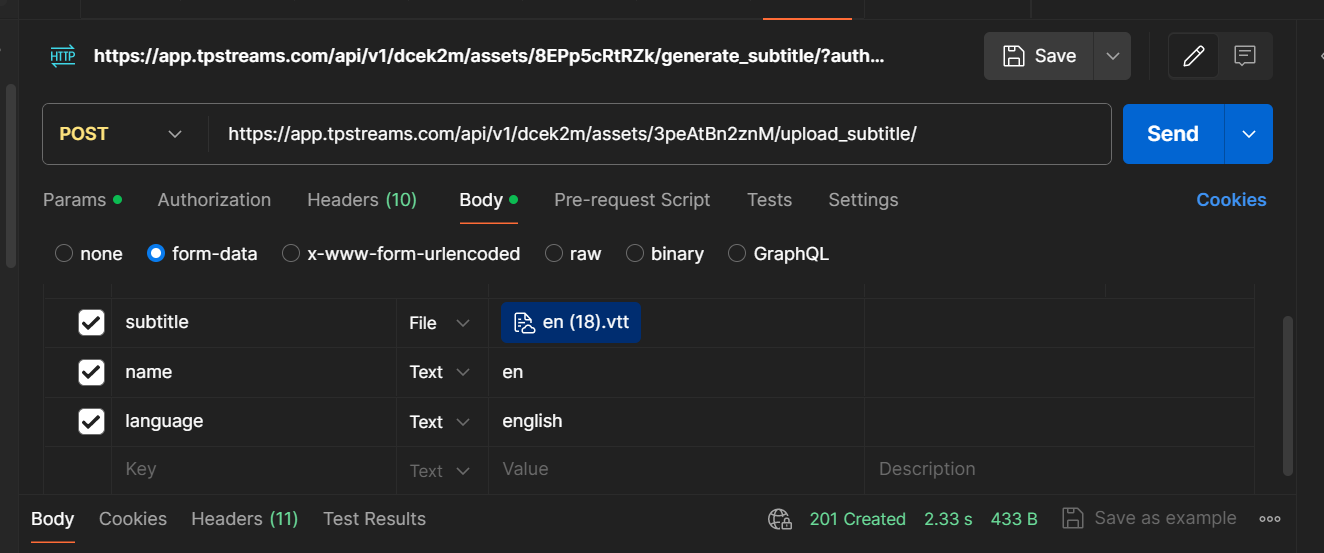
Send the subtitle file using form-data in the request body.
To know language code please check Language-codes
Sample Postman request body (Form-data only)
Response
For valid requests the API server returns a JSON:
{
    "detail": "Subtitle uploaded successfully"
}
For subtitle upload, use form-data in the request body. Select your .vtt file with the "subtitle" key.
List Subtitles for an Asset
To retrieve a list of all subtitles associated with a video asset, you need to send an HTTP GET request to the API Endpoint, with the authentication Header.
Endpoint
https://app.tpstreams.com/api/v1/<organization_id>/assets/<asset_id>/subtitles/
Response
For valid requests the API server returns a JSON list of subtitle tracks:
[
    {
        "id": 12,
        "type": "Subtitle",
        "name": "English",
        "url": "https://d28qihy7z761lk.cloudfront.net/transcoded/7cFHfFSfjna/subtitles/en.vtt",
        "bytes": 1024,
        "subtitle_type": "Auto Generated"
    },
    {
        "id": 15,
        "type": "Subtitle",
        "name": "Spanish",
        "url": "https://d28qihy7z761lk.cloudfront.net/transcoded/7cFHfFSfjna/subtitles/es.vtt",
        "bytes": 2048,
        "subtitle_type": "Uploaded"
    }
]
Delete a Subtitle
To delete a specific subtitle track, send an HTTP DELETE request to the API Endpoint, with the authentication Header.
Endpoint
https://app.tpstreams.com/api/v1/<organization_id>/subtitles/<subtitle_id>/
Alternatively, you can delete a subtitle using the asset context:
https://app.tpstreams.com/api/v1/<organization_id>/assets/<asset_id>/subtitles/<subtitle_id>/
Response
For successful deletion, the API server returns a 204 No Content status code with an empty body.
You cannot directly delete an auto-generated subtitle track. Attempting to do so will return a 403 Forbidden response.